
Available now
LIA Plugin for Ableton Live
Control your Ableton Live session with natural language. Type or speak in any language. LIA executes directly in your Ableton Live session: MIDI generation, beat building, reference-based generation, and mixing suggestions via Pro Tip Apply. All from your browser, on desktop or phone.
Works with Ableton Live 12+ on macOS and Windows. Other DAWs are not live integrations yet.
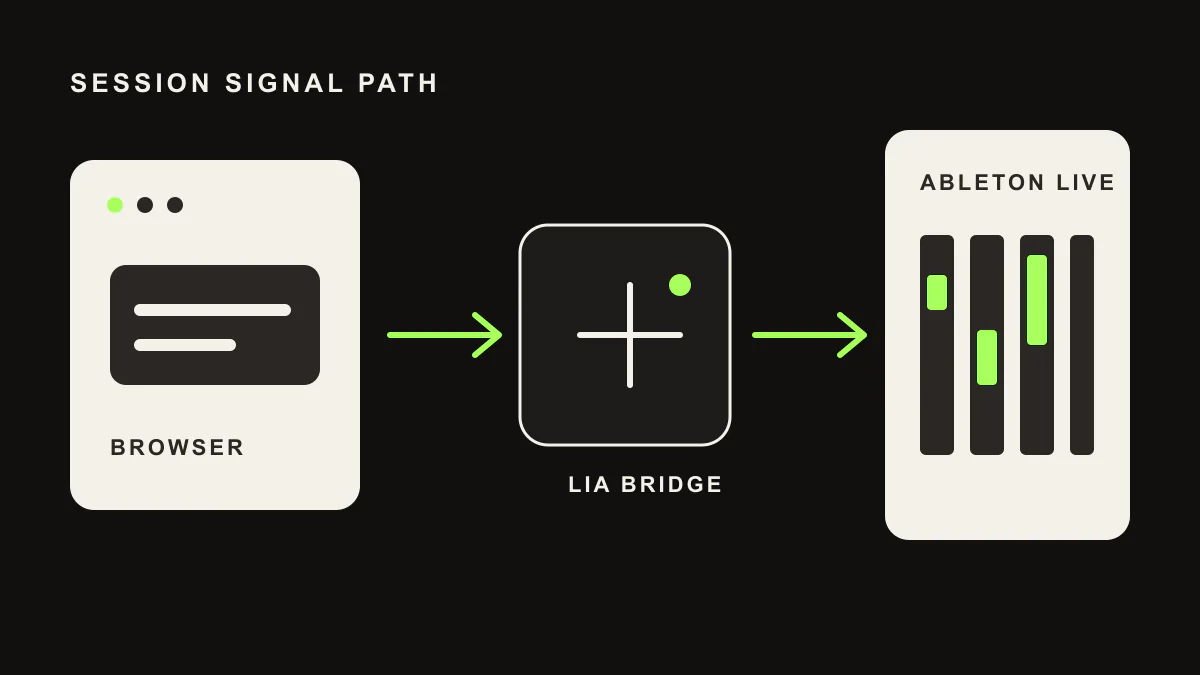
An assistant in a real Ableton session
LIA controls a real Ableton session and keeps the result editable. The producer stays in control.
-
What is LIA for Ableton Live?
LIA is an AI assistant for Ableton Live that turns natural-language prompts into editable MIDI, beat patterns, track and session actions, and follow-up refinements through the LIA Bridge.
-
Does LIA replace producers?
No. LIA speeds up the workflow but keeps the producer in control. Notes, clips, tracks, and session decisions stay editable inside Ableton.
-
What is live today?
Ableton Live is the live integration through the LIA Bridge on macOS and Windows. Other DAWs are not live integrations yet.
What LIA does inside Ableton
Native Ableton Live API integration via the LIA Bridge on macOS and Windows. No MIDI mapping, no macros required.
-
MIDI Generation
LIA generates MIDI patterns from natural-language descriptions: melodies, chord progressions, basslines, and drum hits directly into Ableton clips. Specify key, tempo, groove, and reference styles.
-
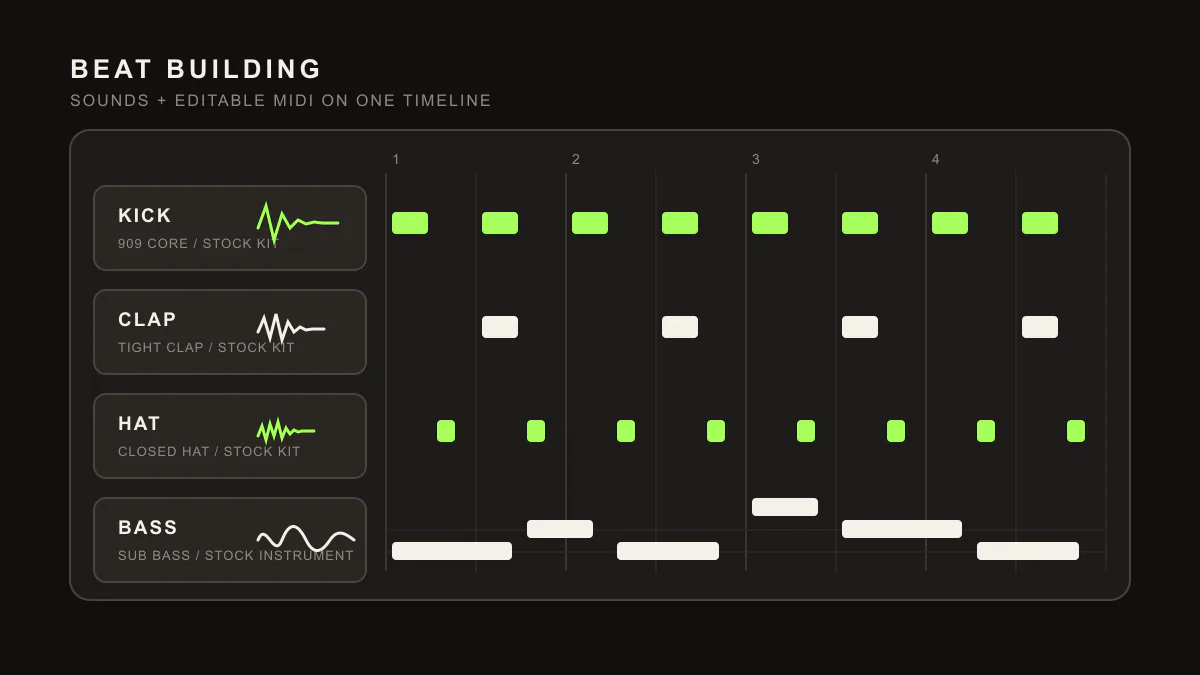
Beat Building
Describe a drum feel and LIA programs the pattern into Ableton drum racks or MIDI clips. Kick, snare, hats, percussion at the BPM and groove you want.
-
Reference-Based Generation
Give a style or reference direction, like "dark hypnotic techno". LIA reads that framing and generates editable MIDI that fits the requested aesthetic.
-
Conversational Refinement
Iterate via chat: "sparser hats", "lower the bass an octave", "swing the kicks". LIA refines the generated MIDI through dialogue inside the live Ableton session.
-
Pro Tip Apply
LIA suggests mixing decisions such as EQ frequencies and compression settings, then applies reachable preset or parameter actions via the Ableton control surface where supported. You stay in control of the final sound.
-
Voice, MIDI, Remote
Speak commands instead of typing. Generate editable MIDI from prompts and references. Control your Ableton session remotely from web or mobile web. Multi-language interface in 10 languages.
Which DAWs LIA supports
Ableton Live is supported today through the LIA Bridge. Other DAWs are on the waitlist.
- Ableton Live Live
- Logic Pro Waitlist
- FL Studio Waitlist
- Cubase Waitlist
- Pro Tools Waitlist
- Studio One Waitlist
- Reaper Waitlist
- Bitwig Studio Waitlist
- Reason Waitlist
LIA is not affiliated with or endorsed by these DAW makers. Ableton Live is the current live Bridge integration. Other DAWs are not live Bridge integrations yet. Product names are trademarks of their respective owners.
Related articles
FAQ
Frequently asked questions
How does LIA work with Ableton Live?
LIA Bridge connects the browser app to Ableton Live on macOS and Windows. Type or speak what you want, and LIA turns the request into editable session actions inside Ableton Live.
Does LIA require a specific Ableton Live setup?
Use the current LIA Bridge package for Ableton Live on macOS or Windows. The setup flow guides installation, Bridge selection and local health checks before production use.
Is LIA an audio plugin or a browser app?
LIA is browser-based with a small Bridge package for Ableton Live. There is no VST or AU plugin to install. You keep your instruments, sound library and routing.
What if I use another DAW?
Other DAWs are not live integrations yet. Use LIA for exportable MIDI ideas and production notes today, then join the waitlist for direct Bridge support updates. No date is promised.
Ready to produce with AI?
Works with Ableton Live 12+ on macOS and Windows today. Other DAWs are not live integrations yet.